In this post, you will learn how to install the Microsoft Graph PowerShell Module. In addition, I’ll show you how to verify the install, check available commands and connect to MS Graph.
The MS-Graph PowerShell module allows you to manage Microsoft 365 services from the command line such as, creating users, managing groups, device management and more.
Steps to Install Microsoft Graph using PowerShell
Step 1. Open PowerShell
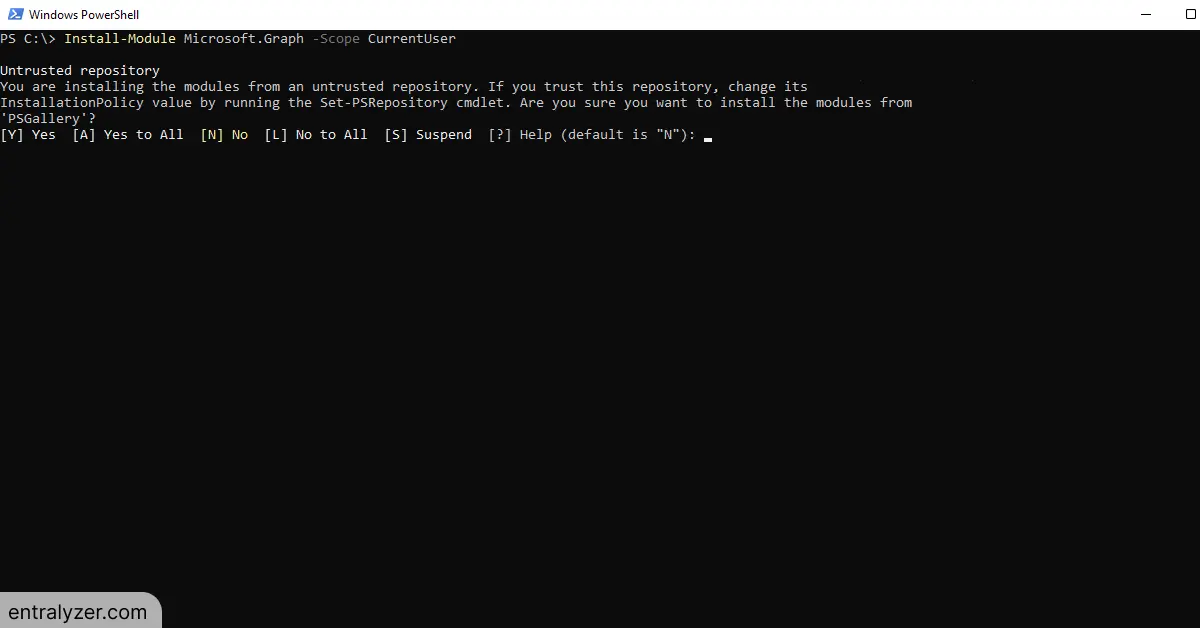
Step 2. Enter the command below to install Microsoft Graph
Install-Module Microsoft.Graph -Scope CurrentUser
The -Scope parameter is used to specify which users to install the module for.
To install for all users, use AllUsers and use Currentuser to install only for the current user.

Step 3. Accept the untrusted repository
Type Y to install from Untrusted Repository

The installation will begin. The installation could take a few minutes to complete

Step 4. Verify Microsoft Graph Module is installed
To verify that Microsoft Graph Module is installed use the following command
Get-InstalledModule -Name Microsoft.Graph

List all commands in the Microsoft Graph Module
To see all the available cmdlets in the MS Graph module run the command below.
Get-Command -Module Microsoft.Graph*

Connect to Microsoft Graph PowerShell
When you connect to Microsoft Graph, the -scopes parameter specifies the permissions you want to have when connecting. These permissions determine what operations can be performed using the Microsoft Graph module. The -scopes command is not required, if you don’t use -scopes it will use your accounts permissions
Connecting without -scopes
Connect-MgGraph
Using -scopes to request specific permissions
Connect-MgGraph -Scopes "User.Read"
To learn more about Microsoft Graph permissions refer to the article below.
https://learn.microsoft.com/en-us/graph/permissions-reference
Updating Microsoft Graph Module
Microsoft is consistently updating their modules. To make sure you are up to date with the latest updates, run the command below.
Update-Module -Name Microsoft.Graph
What is Microsoft Graph used for?
The Microsoft Graph PowerShell module is used to manage Microsoft 365 services and resources. Below are some key functions of the module.
- Manage user accounts: You can create, update and delete user accounts in Entra ID.
- Group Management: Create, update and modify groups in Microsoft 365.
- Device Management: Enroll devices in Intune, configure policies and more.
- Mail and Calendar: Manage mailboxes, create and update calendars.
- Teams: Create and manage teams, assign users to teams.
- Get MFA Status: Check the MFA status for single or all users
Conclusion
Installing Microsoft graph PowerShell is a very simple and makes managing Microsoft 365 services easier. Managing 365 from the Admin Center Web App can be challenging as you often need to click through multiple screens to accomplish a simple task. By using PowerShell, you can streamline 365 administrative tasks and save yourself lots of time.
I hope you enjoyed this article, if you have questions, leave a comment below.