
Restore Deleted Microsoft 365 User Account
In this guide, you’ll learn how to restore a deleted Microsoft 365 user account.
Restoring a Microsoft 365 user account allows you to recover an account that was deleted. When a user is deleted, Microsoft 365 does not remove it right away. Instead the account is kept in a deleted users state for 30 days. During this time, the account can be restored with its username and data. After 30 days, the account is permanently deleted and cannot be recovered, so it’s important to restore it as soon as possible if needed.
Prerequisites
Section titled “Prerequisites”- Time frame: The user must be restored within 30 days of deletion. After 30 days, the account is permanently deleted and cannot be restored by admins or Microsoft support
- Who can restore deleted users:
- User Administrator
- Global Administrator
Restore a user in the Microsoft 365 admin center
Section titled “Restore a user in the Microsoft 365 admin center”This example, walks through how to restore a deleted users from the 365 admin center.
-
Log into the Microsoft 365 Admin Center and go to
Users>Deleted Users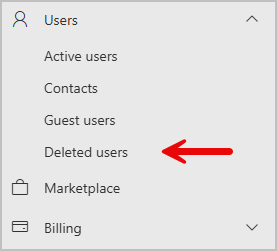
-
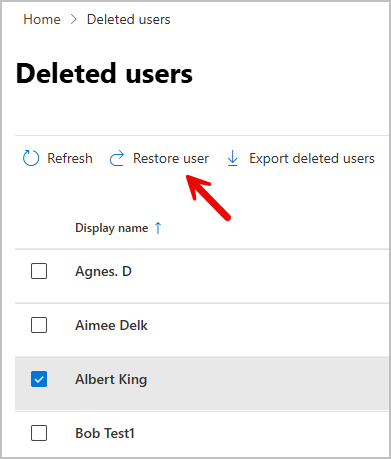
Select the user you want restored, then select Restore user at the top of the page.
-
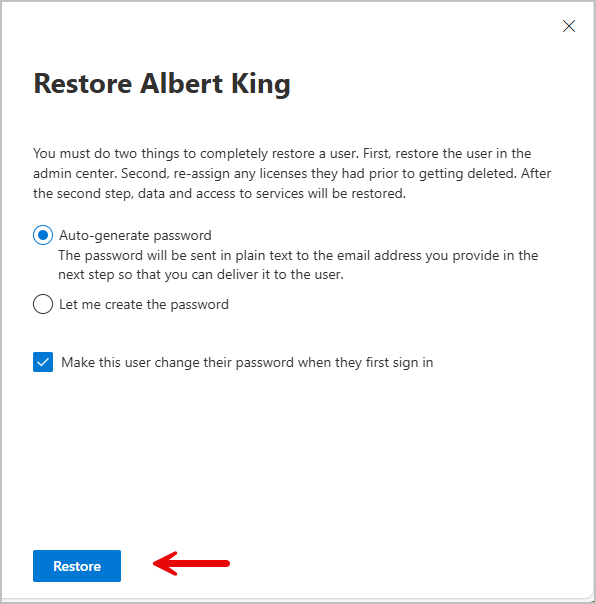
You must create a new password for the account or let one auto-generate. Then click restore.
-
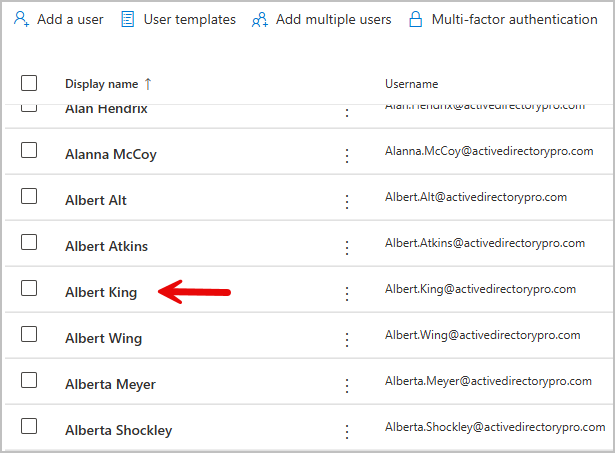
The account has now been restored and should appear under Active Users
Restore a deleted 365 user with PowerShell
Section titled “Restore a deleted 365 user with PowerShell”-
Install the graph module.
Terminal window Install-Module -Name Microsoft.Graph -Scope CurrentUser -
Connect to Microsoft graph
Terminal window Connect-MgGraph -Scopes User.ReadWrite.All, Directory.AccessAsUser.All -
Run this command and find the Id of the account you want to restore. In my example I am going to restore the Aimee Delk account.
Terminal window Get-MgDirectoryDeletedItemAsUser -All![find account id]/docs(/img/guides/365/restore-user-5a.png)
-
Run the command below to restore a user account. Replace ObjectID With the Id of the account you want restored.
Terminal window Restore-MgDirectoryDeletedItem -DirectoryObjectId <ObjectID> -
The account will now be restored.

Common Restore Conflicts
Section titled “Common Restore Conflicts”Sometimes when you restore an account you can run into some issues. Below are some of the most common issues people run into when restoring accounts.
1. UPN (Email) already in use.
Section titled “1. UPN (Email) already in use.”Description: Another user or object is already using the same User Principal Name
Fix: Rename or remove the conflicting account, then retry the restore.
2. Email/Proxy Address Conflict.
Section titled “2. Email/Proxy Address Conflict.”Description: The primary email address or alias is assigned to another object.
Fix: Remove or change the conflicting email address
3. Directory Sync Conflict.
Section titled “3. Directory Sync Conflict.”Description: Another soft-deleted object exists with the same UPN or email.
Fix: Permanently delete the soft-deleted object with the same name.
Conclusion
Section titled “Conclusion”Restoring a Microsoft 365 account is quick and straightforward as long as it’s done within 30 days of deletion. During this time the user’s account and data is able to be fully recovered. After 30 days, the account is permanently deleted and can no longer be restored, so it’s important to restore quickly if the user needs access again.